DOCUBIRD
Sign in Start free
Docubird for Home care and support providers

Care agreements signed by the family, wherever they live

A new package of care often needs the person receiving it, a family member and your registered manager to agree. Docubird sends it to each of them in order, lets relatives sign from their phone, and shows your office who is still to sign.

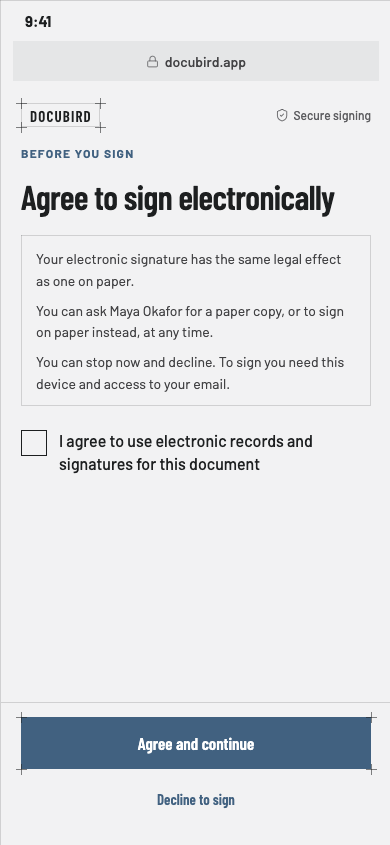
A plain-language consent screen before signing electronically on a phone
What you send

Documents home care sign with Docubird

  • Service user agreements
  • Care plan agreements
  • Fee agreements
  • Staff contracts
  • Policy acknowledgements
  • Supplier agreements
Common scenarios

Where the paperwork usually gets stuck

01

A new care package with family involved

The situation

The person receiving care, their daughter who lives two hours away, and your manager all need to agree the terms.

With Docubird

Your manager approves first, then the person and their relative sign in the same step. The relative signs from their phone, with no need to visit the office.

Who signs, in order
  1. 1
    Step 1
    RMRegistered managerNeeds to approve
  2. 2
    Step 2
    PRPerson receiving careNeeds to sign
    FMFamily memberNeeds to sign
  3. 3
    Step 3
    OTOffice teamReceives a copy
02

New carers before their first visit

The situation

A carer can’t start until their contract and policy acknowledgements are signed.

With Docubird

Send them as one request with a due date. They sign on their phone between visits, and the office sees when it’s done.

Who signs, in order
  1. 1
    Step 1
    NCNew carerNeeds to sign
  2. 2
    Step 2
    CCCare coordinatorNeeds to sign
03

Making sure the right relative opens it

The situation

Care agreements contain personal details and shouldn’t be opened by the wrong person.

With Docubird

Add an access code you give them by phone, or a one-time code emailed when they open the link.

Who signs, in order
  1. 1
    Step 1
    FMFamily memberNeeds to sign
What gets lighter

Less admin, fewer chasers

BeforeWith Docubird
Posting agreements to relatives They sign from their phone wherever they live
Carers waiting to start Contracts signed between visits
“Has the family signed yet?” The office sees each step and each person’s status
Proving who agreed A certificate page with who signed and when
Questions

Home care: good to know

Can family members sign without an account?+

Yes. They open the emailed link on any phone or computer.

Can we check the right person signed?+

Add an access code you share with them, or a one-time code emailed when they open it.

Does Docubird replace our compliance checks?+

No. Docubird handles sending and signing. Keep following your own data protection and regulatory processes.

Related industries

All industries

Spend the time on the work, not the paperwork.

Three free signing requests every month. Your signers never need an account.

Send your first request free