DOCUBIRD
Sign in Start free
Docubird for Builders and trades

Quotes accepted and variations signed from the van

Most disputes on a job start with something agreed verbally. Docubird lets you send a quote, a variation or a completion sign-off from your phone, and get it signed before the next stage starts.

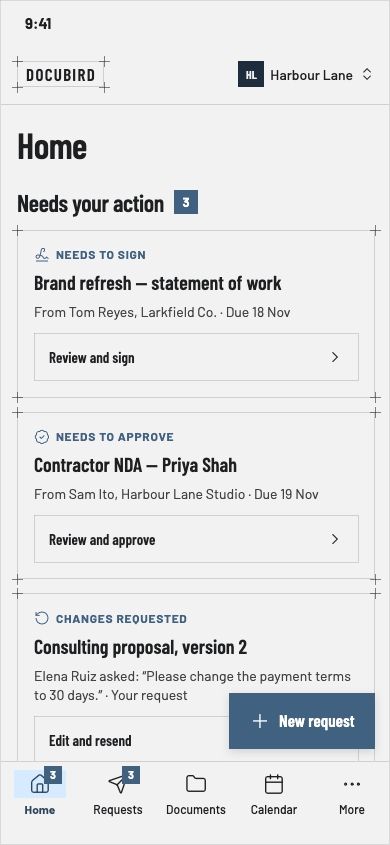
Docubird Home on a phone showing requests that need action and who you are waiting on
What you send

Documents builders and trades sign with Docubird

  • Quotes and estimates
  • Contracts
  • Variation orders
  • Subcontractor agreements
  • Completion sign-off
  • Site safety forms
Common scenarios

Where the paperwork usually gets stuck

01

A customer adds extra work halfway through

The situation

The customer wants a second socket run. You agree on site, then argue about it on the invoice.

With Docubird

Send a one-page variation with the new price before you start. They sign on their phone in the kitchen and you both keep the sealed copy.

Who signs, in order
  1. 1
    Step 1
    HHomeownerNeeds to sign
  2. 2
    Step 2
    YYouReceives a copy
02

Getting a subcontractor onto site

The situation

A new plasterer starts Monday and still hasn’t signed the agreement or the safety form.

With Docubird

Send both with a due date. Docubird reminds them, and the calendar shows the deadline next to your other jobs.

Who signs, in order
  1. 1
    Step 1
    SSubcontractorNeeds to sign
  2. 2
    Step 2
    SMSite managerNeeds to sign
03

Signing off a finished job

The situation

You want written confirmation the work is complete before the final invoice goes out.

With Docubird

Send a completion form with a checkbox list and a signature. You get back a dated, sealed PDF.

Who signs, in order
  1. 1
    Step 1
    CCustomerNeeds to sign
What gets lighter

Less admin, fewer chasers

BeforeWith Docubird
Verbal agreements on site A signed variation before work starts
Paperwork in the van Everything sent and signed from your phone
Chasing subbies for forms Due dates and automatic reminders
Proving the job was signed off A sealed PDF with the date and signer recorded
Questions

Builders and trades: good to know

Can I send from my phone?+

Yes. Docubird works on iPhone, Android and the web.

Can the customer tick boxes as well as sign?+

Yes. Add checkbox, choice, text and date fields as well as signatures.

What if the customer doesn’t have an email app?+

They can open the link in any web browser on their phone.

Related industries

All industries

Spend the time on the work, not the paperwork.

Three free signing requests every month. Your signers never need an account.

Send your first request free